
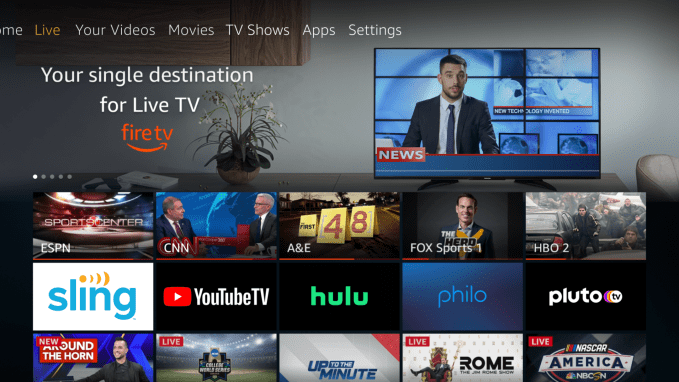
Amazon is upgrading its Fire TV’s live TV experience through new integrations with several live TV streaming services, including Sling TV, YouTube TV, and Hulu + Live TV. Live content from these services will now appear within key areas with the Fire TV user interface, including the Fire TV’s Live tab and Channel Guide, making Fire TV feel even more like a cable TV replacement than before.
Already, Amazon Fire TV had offered integrations with nearly 20 other apps in a similar fashion, including live TV apps like Philo and Pluto TV, as well as its own Prime Video Channels.
But the addition of Sling TV, YouTube TV and Hulu + Live TV brings in the three largest and most popular apps among cord cutters who are paying for a live TV experience. Sling TV has 2.31 million subscribers; YouTube TV has over 2 million; and Hulu + Live TV has 3.3 million.
Live content from these apps will be found within three main sections: the Live tab, the “On Now†rows and the multi-app Channel Guide.
Streaming live TV over the internet has become a more popular option for cord cutters over the years, as it offers a less expensive way to have a cable TV-like experience. Unfortunately, that gap has been closing in more recent months, as live TV users have been subjected to continual price increases as the services expanded their channel lineups.
However, many live TV customers remain because even with the increases, it can still be slightly less than cable and offers more flexibility — like working across platforms and not tied to a cable box.
This trend toward live content has also been seen on Fire TV, Amazon says.
The Live tab has become the second-most-visited destination on the Fire TV interface after the Home screen, due to its integrations of live content, the company noted. In addition, live TV streaming apps on Fire TV have seen the total time spent in app and active customers more than double, on average, since Fire TV added its live TV discovery integrations.
Image Credits: Amazon
“Fire TV is hugely popular among Philo fans. Since integrating with Amazon’s live streaming discovery features, the number of active Philo users is up nearly 2.5x on Fire TV,†said Philo CEO Andrew McCollum, whose TV streaming app was one of the earlier additions to Fire TV.
To use new integrations, you’ll first need to log into the streaming app you subscribe to with your current account information. You can then access the app’s live content across the Live Tab, which organizes live content in the familiar Netflix-like style of scrollable rows. Here, there are rows for things like “Live Sports†and “Live News,†plus content from your subscriptions’ channels.
From here, you can hop into the Channel Guide, which offers the more traditional grid guide, similar to cable TV.
This format is proving popular among live TV service subscribers.
On Monday, for example, Roku introduced its own Live TV Channel Guide, accessible via a new tile, which allows Roku users to browse the free live and linear content Roku offers in a similar way.
Amazon’s Fire TV platform, however, has the perk of Alexa integration.
That means users can ask Alexa to open the Channel Guide or even change the channel, by saying “Alexa, tune to [name of channel],†for example. This works via built-in Alexa on the Fire TV Cube, via a paired Echo device, or by using the Fire TV’s Alexa Voice Remote, depending on your setup.
“We’re excited to welcome Sling TV, Hulu + Live TV, and YouTube TV into our integrated suite of Live TV discovery features,†said Sandeep Gupta, VP of Fire TV, in a statement. “We believe the future of Connected TV is one that brings live content forward, simplifies the streaming and OTT landscape, and enables customers to discover the programs they want to watch with ease,†he added.
Sling TV’s integration began rolling out earlier this year, Amazon clarifies, but is being officially announced today.
YouTube TV will be available starting today, and Hulu + Live TV will become available in the coming weeks.
Click here for more...
from #Bangladesh #News aka Bangladesh News Now!!!



No comments:
Post a Comment